/
/
/
How to Restore Old Photos with AI: Bring Your Precious Memories Back to Life in 2026
How to Restore Old Photos with AI: Bring Your Precious Memories Back to Life in 2026

PicYou
Mar 13, 2026

Do you have a box of faded, scratched, or blurry family photos tucked away in a drawer? In the past, professional photo restoration cost hundreds of dollars and took weeks. In 2026, thanks to the evolution of restore old photos AI technology, you can revive those priceless moments in seconds.
Whether it’s a grainy picture of your grandparents or a torn wedding photo from decades ago, Picyou.ai offers a professional-grade AI Old Photo Restoration tool that makes history look like it was captured yesterday.
1. Why Use AI to Restore Old Photos?
Old photographs are fragile. Over time, they suffer from light exposure, humidity, and physical wear. Using an AI photo colorizer and restoration tool isn't just about "fixing" a picture; it's about preserving your family heritage.
Modern AI models can now:
Remove Scratches & Tears: Automatically identify and fill in missing parts of an image.
Upscale Resolution: Turn a small, grainy 20th-century print into a 4K digital file.
Inject Emotion with Color: Use a sophisticated AI photo colorizer to add realistic skin tones and environmental hues to B&W shots.
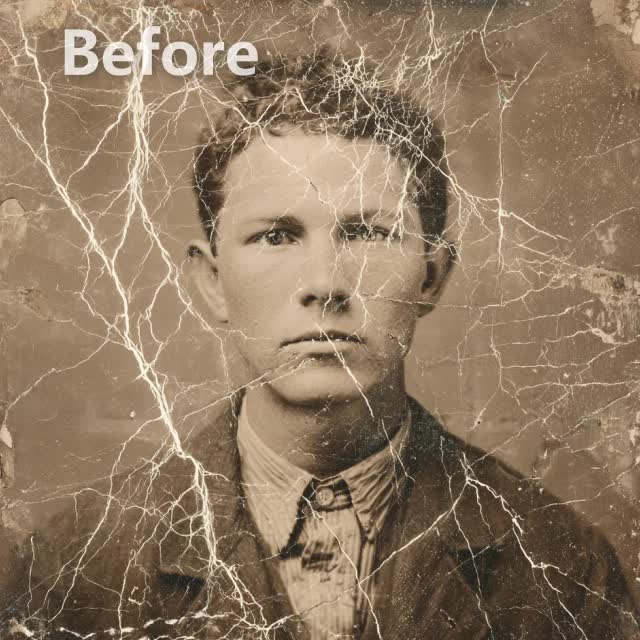
2. Key Features of Picyou.ai Restoration Suite
While there are many tools online, Picyou.ai stands out by combining multiple editing steps into one seamless workflow.
A. Unblur Face AI: Sharpening the Details
The biggest challenge with old photos is motion blur or low-resolution lenses. Our unblur face AI uses deep learning to reconstruct facial features—eyes, hair, and skin texture—without making them look "plastic" or fake.
B. Intelligent AI Photo Colorizer
Our algorithm doesn't just "paint" the photo; it analyzes the context. It recognizes grass, sky, and clothing textures to apply the most historically accurate colors possible.
C. Comprehensive Editing Templates
Beyond simple restoration, our Photo Editing Templates allow you to stylize your restored photos, making them perfect for anniversary gifts, family trees, or social media sharing.
3. Step-by-Step Guide: How to Restore Your Photos on Picyou.ai
Restoring your history is easier than you think. Follow these three simple steps:
Digitize and Upload: Scan your old photo or take a high-quality smartphone picture of it. Upload it to the Picyou AI Photo Restore tool.
Auto-Repair & Unblur: Let the restore old photos AI engine analyze the damage. In one click, it will remove scratches and use the unblur face AI to sharpen the subjects.
Colorize & Enhance: Toggle the AI photo colorizer to see the transformation from black-and-white to vivid color.
Download & Share: Save your high-resolution image and share it with your family!
4. Pro Tips for the Best AI Restoration Results
Lighting Matters: When digitizing old prints with your phone, avoid direct glare or shadows.
Don't Crop Too Early: Upload the full original image. The AI performs better when it has more "context" around the edges of the photo.
Explore Templates: Use our editing tools to adjust the final contrast and brightness for that perfect "studio" look.
5. Frequently Asked Questions (FAQ)
Can AI fix a very badly torn photo?
Yes, the restore old photos AI on Picyou.ai is designed to bridge gaps and "heal" torn sections by analyzing the surrounding pixels and textures.
Is the unblur face AI safe for my privacy?
Absolutely. At Picyou.ai, your uploaded photos are processed securely, and we prioritize user data protection throughout the restoration process.
Does it work on black-and-white photos from the 1920s?
Yes! Our AI photo colorizer is trained on millions of historical images to ensure that the colorization of vintage photos looks natural and era-appropriate.
Conclusion: Don't Let Your Memories Fade
Your family history is irreplaceable. With the power of Picyou.ai, you have the world’s most advanced restore old photos AI at your fingertips. From fixing scratches to using unblur face AI for crystal-clear portraits, we make the past feel present.
Start Restoring Your Old Photos for Free on Picyou.ai Today!